
Issue when starting Gridlight for the first time. The message pops up several times during startup, but each time it ultimately times out around 61%. It persists despite uninstalling/reinstalling Grilight.
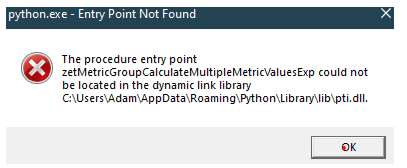
Here's what's happening in plain terms: your computer has a small helper file (pti.dll) that Gridlight uses to communicate with your Intel graphics card. The version of that file on your system is outdated and is missing something Gridlight needs. Think of it like trying to plug a newer charger into an older port — the shapes don't quite match.
The good news is this is a straightforward fix. Here's what to do, in order:
Step 1 — Update your Intel graphics driver
This is the most likely fix on its own. Your Intel driver installer will replace the outdated file automatically.
-
Go to Intel's driver download page and search for your graphics driver (Arc, Iris, or UHD depending on your system)
-
Download and run the installer
-
Restart your computer when prompted
Step 2 — Reinstall Gridlight
Once your driver is updated and your computer has restarted, uninstall Gridlight, reinstall it fresh, and go through the setup again. In most cases this is all you'll need.
Step 3 — If it still fails (optional cleanup)
If you're still seeing the error after Steps 1 and 2, the old file may still be lingering. Here's how to remove it:
-
Press Win + R, type
%APPDATA%\Python\Library\liband hit Enter -
Look for a file called
pti.dll -
Rename it to
pti.dll.old(don't delete it yet, just in case) -
Try launching Gridlight again
If none of the above works, reply here and we'll jump on a quick call to sort it out. You're not far off — this is a known compatibility quirk with Intel systems and we've seen it resolve quickly once the driver is current.